
You might already use a laptop every day. You can search Google, send emails, fill in an online form, and maybe join a Zoom call without much trouble. But when you look at university courses or job adverts, the language often feels a step ahead. They ask for confidence with spreadsheets, digital research, online collaboration, data handling, or sector-specific systems.
That gap can feel discouraging, especially if you're returning to education after years away or trying to change career without traditional qualifications. The good news is that this feeling is common, and it doesn't mean you're “bad with technology”. It usually means you've learned the basics informally, but nobody has yet shown you how those basic habits turn into job-ready information and communication technology skills.
Your First Step in a Digital World
Many adults are more capable than they think. In the UK, 76% of adults aged 16 and over have demonstrated basic information and communication technology skills, according to ITU reporting on ICT skills and digital participation. That tells us something important. Basic use of digital tools is already prevalent in everyday life.
The problem isn't usually starting from nothing. The difficulty is moving from everyday use to confident, purposeful use.
Basic skills are only the starting line
Knowing how to open a browser or type a message is useful, but university study and professional work ask for more than that. They expect you to find reliable information, organise files properly, communicate clearly online, work with data, and use software to solve problems.
Basic digital use helps you take part. Strong ICT skills help you progress.
Many adult learners frequently get stuck at this point. They assume everyone else understands these systems naturally. In reality, individuals build these abilities step by step, often through education, guided practice, and repeated use in realistic tasks.
What counts as ICT skills
When people talk about information and communication technology skills, they usually mean the ability to use digital tools to access information, communicate, organise work, and complete tasks effectively. That includes practical tools such as Microsoft Word, Excel, email platforms, cloud storage, virtual learning environments, and video meeting software.
It also includes habits that aren't always visible at first:
- Finding information well so you can search, judge, and use online material sensibly
- Managing digital work through folders, filenames, documents, and deadlines
- Communicating professionally by email, message, call, and shared online spaces
- Solving problems when software, files, or systems don't behave as expected
If you're worried that you only know “the basics”, you're not behind. You're at the first useful stage. From there, the aim is to build skills that apply in real courses, real workplaces, and real career paths.
What ICT Skills Really Mean for Your Career
A lot of people hear “ICT skills” and think it only means using a computer. That's too narrow.
There's a big difference between being able to click around a screen and being able to use digital tools well enough to support study, improve your work, or help a team get results. It's the difference between knowing the alphabet and writing something clear and effective with it.
Digital literacy and ICT competence aren't the same
Digital literacy is your basic ability to use devices and online tools. You can log in, search online, type, browse, and send messages. That matters, but it isn't the whole picture.
ICT competence is what happens when you use those tools with purpose. You choose the right software, organise information, communicate clearly, and complete a task that has a real outcome.
Work-ready ICT skills mean selecting and applying digital tools to achieve a specific outcome, not just knowing where the buttons are.
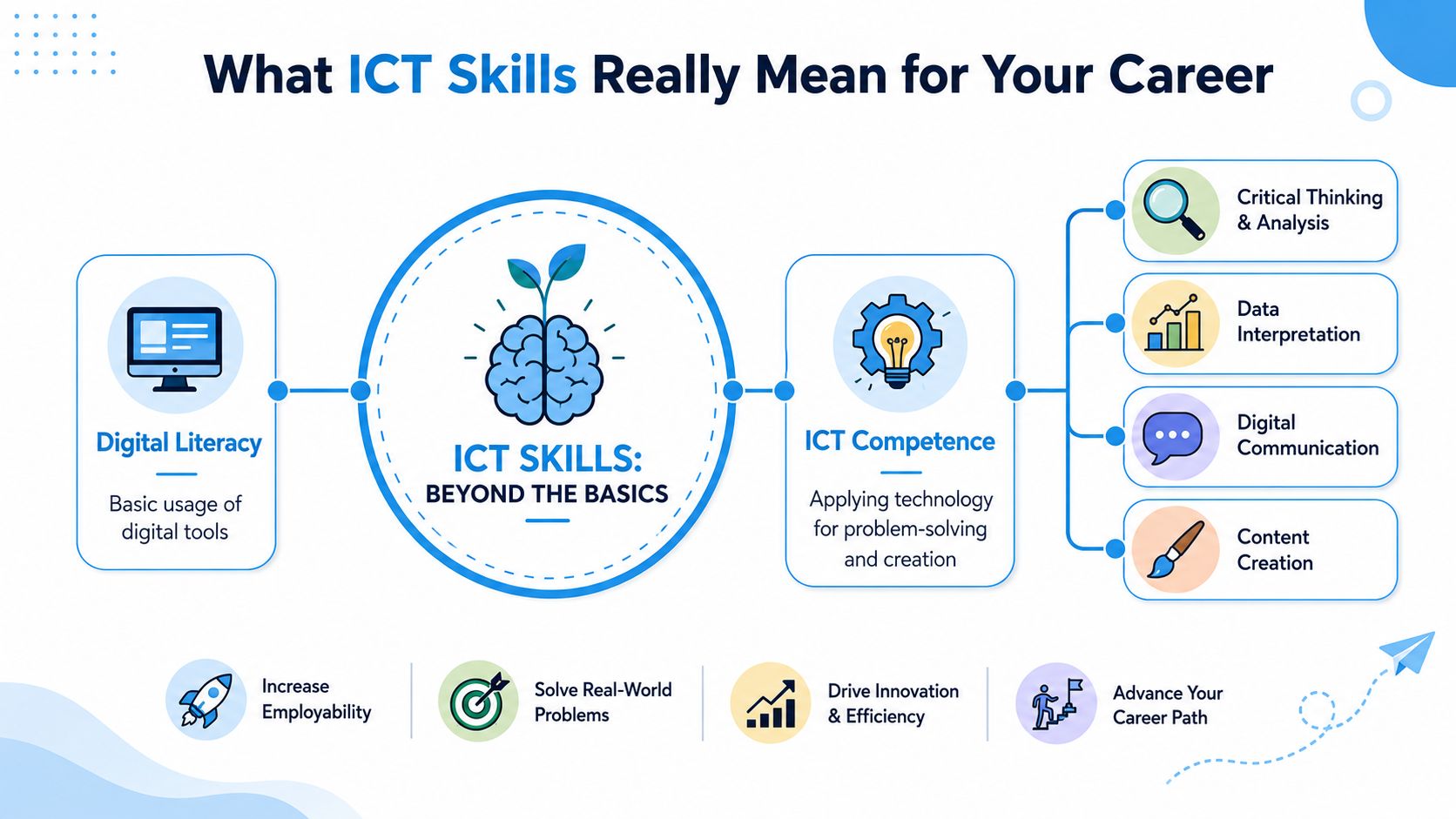
A simple example helps. A person with basic digital literacy can open Excel. A person with stronger ICT competence can build a spreadsheet that tracks deadlines, sorts information, and highlights what needs attention. The second person isn't just using software. They're using technology to think and act more effectively.
The missing middle that holds many adults back
This “missing middle” matters because many adults can do some digital tasks, but not all the tasks modern work expects. According to FutureDotNow's findings on essential workplace digital tasks, 52% of UK working-age adults cannot complete all 20 essential digital tasks needed for the workplace, and the same skills deficit contributes to an economic loss of over £23 billion annually.
That doesn't mean those adults lack ability. It means many haven't been taught how to apply digital skills in workplace settings.
What this looks like in practice
You may be comfortable with everyday tech but still feel uncertain in these situations:
- A college assignment asks you to research, reference, format, and submit work online
- A workplace task requires you to update a shared spreadsheet accurately
- A healthcare setting expects you to use digital records carefully and securely
- A business role involves presenting information clearly in documents or slides
If you're exploring a tech-related path, it also helps to understand how different fields overlap. This guide to computer science vs information technology can help you separate broad career directions without assuming you need to know everything immediately.
The key idea is simple. You don't need to become an expert overnight. You need to move from basic use to confident application.
Why Employers and Universities Demand These Skills
Employers and universities don't ask for ICT skills just to tick a box. They ask because digital systems now sit inside almost every serious task, from research and record-keeping to teamwork and decision-making.
In the UK, the ICT sector employment has surged by over 22% in recent years, according to the Institute for Employment Studies report on ICT sector growth and skills gaps. The same source notes ongoing skills gaps in areas such as Microsoft applications and networking, which continue to hinder productivity. That combination matters. Demand is growing, but capability doesn't always keep pace.
Why employers care
An employer usually isn't just looking for someone who can “use a computer”. They want someone who can work accurately, adapt to new systems, and avoid slowing down a team.
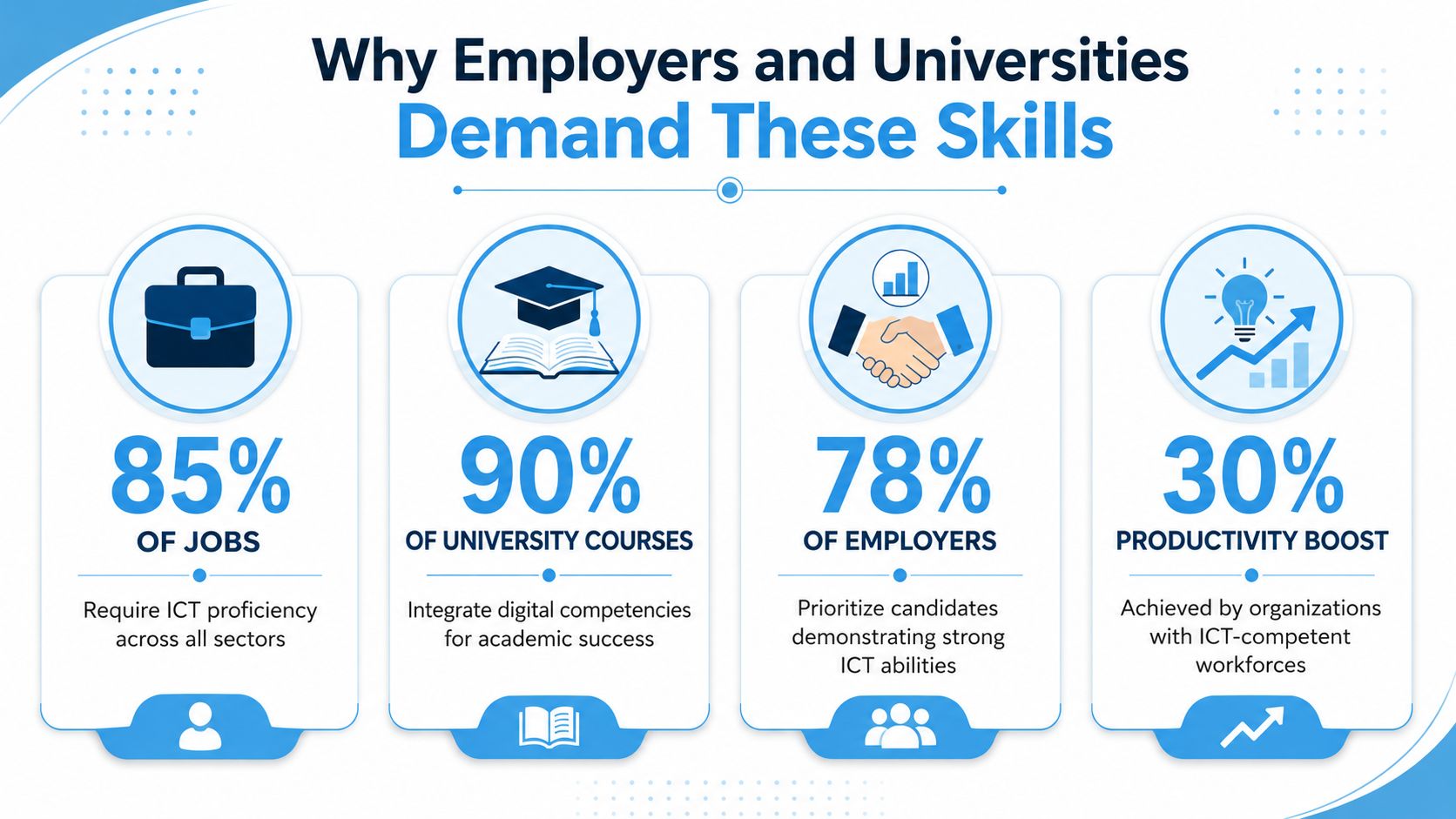
Strong ICT skills often show that a person can:
- Handle information carefully in documents, databases, and shared systems
- Communicate professionally through email, messaging platforms, and video calls
- Work efficiently without needing constant help for routine digital tasks
- Learn new tools when a workplace changes software or processes
If you're looking at the wider employment picture, this overview of the growing demand for digital skills in the job market gives useful career context.
Why universities care
Universities rely on digital systems in nearly every course. Students read journal articles online, submit assignments through online portals, join virtual sessions, communicate through institutional email, and use digital libraries and learning platforms.
A student who lacks confidence with files, formatting, research tools, or online communication can struggle before the academic content even begins. That's why ICT capability matters so early. It supports everything else.
Universities don't only assess what you know. They also expect you to manage, present, and communicate that knowledge through digital systems.
If you're unsure how these skills appear in study, this short video gives a useful introduction to the topic.
What institutions are really measuring
When an employer or university values ICT skills, they're often measuring deeper qualities:
| What they ask for | What they usually mean |
|---|---|
| Confident with digital tools | Can learn systems and work independently |
| Good IT skills | Can complete tasks accurately and professionally |
| Comfortable with online platforms | Can communicate, submit, and collaborate reliably |
| Able to manage information | Can stay organised and avoid preventable mistakes |
That's why these skills matter so much. They're not separate from your future goals. They support your ability to function well within them.
Essential Technical and Communication ICT Skills
Once you move past the broad idea of “being good with computers”, it helps to break ICT down into practical skill areas. Some are technical. Others are about how you communicate and work with people using digital tools.
Core technical skills
These are the skills that help you complete tasks, handle information, and use software confidently in study or work.
| Skill Category | Essential Competencies | Example in Practice |
|---|---|---|
| File and document management | Creating, saving, naming, organising, and locating digital files | Storing assignments in clear folders instead of losing them in downloads |
| Word processing | Formatting text, structuring documents, editing, and proofreading | Producing a clean report in Microsoft Word with headings and references |
| Spreadsheets and data handling | Entering data, sorting, filtering, using formulas, and reading tables | Tracking expenses, deadlines, or patient appointment patterns in Excel |
| Online research | Searching effectively, comparing sources, and selecting useful information | Finding academic articles through a university library portal |
| Presentation software | Designing slides, summarising information, and presenting clearly | Building a PowerPoint presentation for a business proposal |
| Digital security awareness | Using strong passwords, recognising suspicious messages, and protecting data | Avoiding unsafe links and handling sensitive records carefully |
Communication and collaboration skills
These are just as important, especially in university settings and professional roles where people work across teams, departments, or remote locations.
| Skill Category | Essential Competencies | Example in Practice |
|---|---|---|
| Email and professional messaging | Writing clearly, using tone appropriately, and attaching files correctly | Sending a concise email to a tutor with the right document attached |
| Video meetings | Joining calls, muting properly, sharing screens, and participating well | Taking part in a Microsoft Teams seminar without technical confusion |
| Shared online working | Using cloud documents, comments, and version control | Collaborating on a group task through Google Docs or Microsoft 365 |
| Digital problem-solving | Troubleshooting common issues and seeking help effectively | Fixing formatting problems or checking why a file won't upload |
| Information judgement | Recognising reliable material and avoiding misinformation | Comparing websites before using them in coursework |
| Online etiquette | Respectful communication, timing, and awareness of digital professionalism | Writing messages that are clear, polite, and suitable for work or study |
Where learners often get confused
People often assume they must master advanced coding or highly technical systems before they can claim strong ICT skills. That's rarely true at the start.
For most adult learners, the priority is to become reliable in widely used tools and settings. That means being able to produce documents, manage information, work with spreadsheets, communicate online, and learn new platforms without panic.
A useful way to check your progress is to ask yourself three questions:
- Can I complete a task independently?
- Can I explain what I did and why?
- Can I repeat it in a different setting?
If the answer is “not yet”, that's not failure. It tells you what to practise next.
ICT Skills in Healthcare Business and Tech
The easiest way to understand information and communication technology skills is to see how they appear in real working life. The tools change from one sector to another, but the pattern is the same. People use digital systems to organise information, communicate clearly, and make decisions.
Healthcare
A nurse starts a shift and logs into a digital patient record system. They check notes from the previous team, record observations, review medication information, and update care details accurately. Later, they may use an online platform to join training, look up approved guidance, or support a remote consultation through telehealth software.
The skill isn't just “using a computer”. It's using digital systems carefully, confidently, and responsibly in situations where accuracy matters.
In healthcare, ICT skills support safe communication, accurate records, and timely access to information.
A learner preparing for nursing or another health profession often needs practice with structured digital writing, online research, and handling information with care. That's why sector-specific ICT learning matters so much.
Business
A business manager might begin the day by checking emails, reviewing sales figures in a spreadsheet, and updating a shared project board. They may then prepare slides for a meeting, compare performance data, and message colleagues through Microsoft Teams or another collaboration platform.
In that setting, ICT skills support planning and decision-making. The manager needs to read data properly, present ideas clearly, and keep work moving across a team.
Some of the most common business-related digital tasks include:
- Analysing figures in spreadsheets to spot changes or problems
- Creating presentations that explain results without overwhelming the audience
- Working in shared systems so everyone sees the same updated information
- Communicating online with a professional tone and clear next steps
Tech and computer science
In technology-focused careers, the digital demands become more specialised, but the foundations are still familiar. A learner in computer science may start by using version-controlled files, writing and testing code, reading technical instructions, and documenting their work clearly.
The UK skills picture shows where demand is especially strong. According to the IET's UK engineering and technology skills statistics, automation and cybersecurity are the top digital skills needed for growth in the UK, each cited by 38% of respondents, with data engineering at 34% and software development also ranking highly.
That tells aspiring learners something useful. You don't need to start with the most advanced work, but if you're heading towards tech, your ICT foundation should prepare you for structured problem-solving, digital logic, and secure ways of working.
The shared pattern across all three sectors
Healthcare, business, and tech look different on the surface. Yet all three depend on similar habits:
- Using systems accurately
- Managing information carefully
- Communicating clearly
- Learning new tools when required
That's why building ICT skills isn't a side task. It's part of becoming ready for the field you want to enter.
Practical Ways to Develop and Showcase Your Skills
The best approach is to build your ICT skills in layers. Learn the basics properly, practise them in realistic tasks, then collect evidence that shows what you can do.
Build a strong base first
If you've been out of education for a while, start with the essentials. Many adult learners benefit from strengthening English and Maths alongside ICT, because reading instructions, understanding data, writing clearly, and solving problems all support digital work.
Then focus on common tools that appear across study and work:
- Microsoft Word for structured writing and formatting
- Excel for tables, organisation, and simple analysis
- PowerPoint for presenting information clearly
- Email and Teams for professional communication
- Cloud platforms such as Google Drive or Microsoft 365 for shared working
Don't try to learn everything at once. Learn one tool, use it in a meaningful task, then build from there.
Turn knowledge into proof
A skill becomes more convincing when you can show it. That matters for university applications, interviews, and career changes.
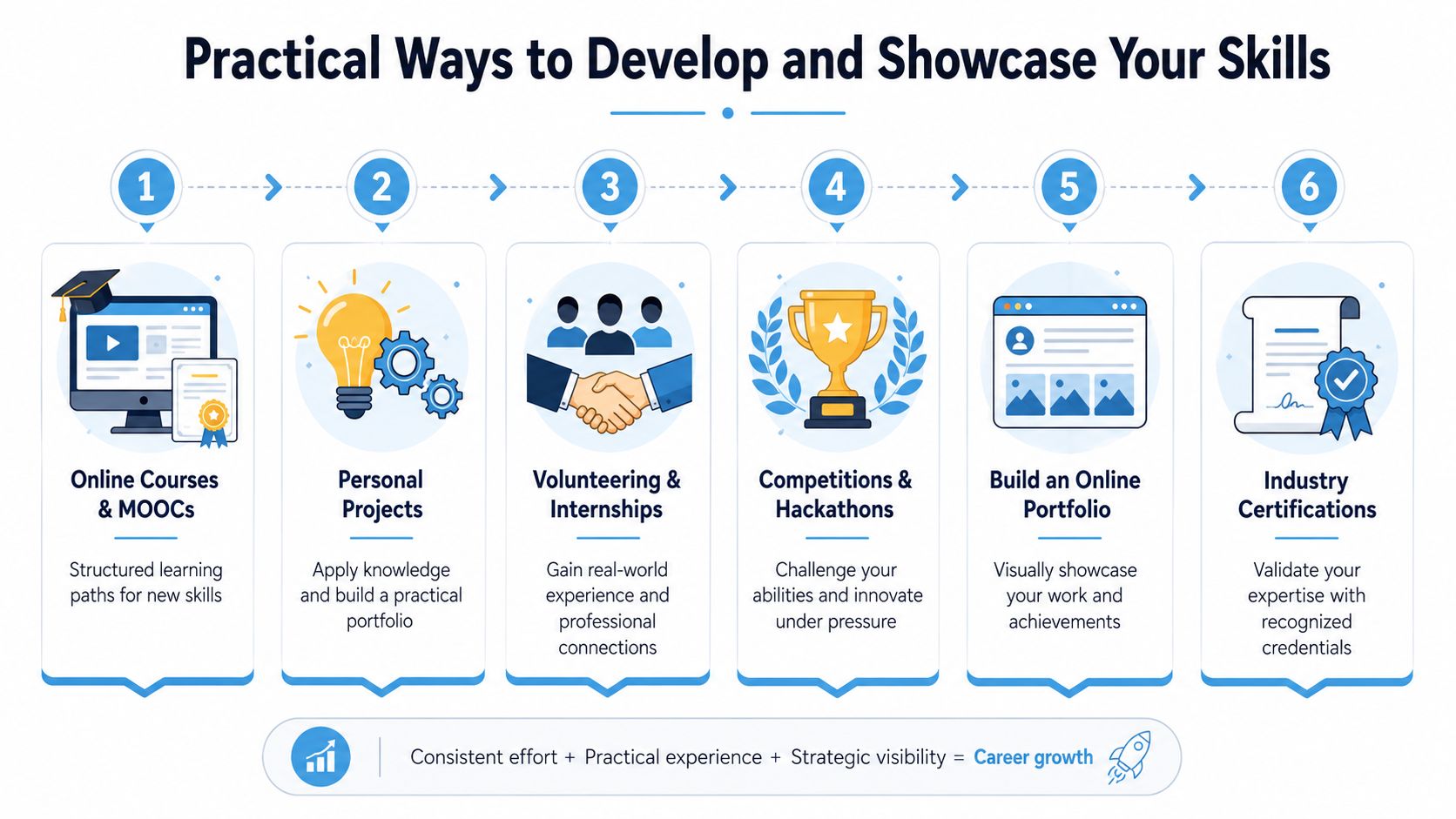
Good evidence doesn't have to be complicated. It can include:
- A spreadsheet project that tracks a household budget or study timetable
- A short presentation explaining a topic you're learning
- A research summary written in Word with clear headings and references
- A simple portfolio folder containing your best digital work
Practical rule: If you can show a completed task, explain how you did it, and reflect on what you learned, you're already building a useful skills portfolio.
Make your progress visible
Many adults underestimate what counts as evidence. Universities and employers often value signs of consistency, organisation, and initiative.
You can make your development visible by:
- Saving good examples of work in organised folders
- Keeping filenames clear so your work looks professional
- Writing short notes on what tools you used and why
- Updating your CV carefully with specific software and tasks rather than vague claims
Instead of saying “good IT skills”, say you used Excel to organise data, Word to prepare structured reports, and Microsoft Teams to collaborate on group work. Specific examples are easier to trust.
Keep the goal realistic
You don't need an impressive technical background to start building information and communication technology skills. You need repetition, guidance, and tasks that connect to your chosen path.
For one learner, that might mean learning to submit assignments properly and manage online research. For another, it might mean becoming confident in spreadsheets before applying for business roles. Progress counts when it's practical and sustained.
Start Your University Journey with an Access Course
For many adults, the biggest challenge isn't motivation. It's finding a route that bridges the gap between everyday digital use and the level expected in higher education.
That's where an Access to Higher Education Diploma can make a real difference. It gives you a structured way to rebuild academic confidence while developing the practical ICT habits that support university study. If you're interested in a technology-related path, exploring an Access to HE Computer Science course can help you see how subject knowledge and digital confidence grow together.

A good Access course doesn't assume you've followed a traditional route through education. It meets you where you are, then helps you progress through supported online study, realistic assignments, and subject pathways linked to careers such as Nursing, Business, and Computer Science.
If you've been wondering whether your current digital ability is “good enough”, the answer is that it can become good enough, and then much stronger. Skills grow when the path is clear and the support is there.
If you're ready to turn basic digital confidence into university-ready and career-focused skills, Access Courses Online offers flexible online Access to HE Diplomas designed for adults returning to education. You can study around work and family life, build confidence step by step, and prepare for progression into subjects including Nursing, Business, and Computer Science.