

You may be looking at a laptop after work, wondering whether a career in technology is still realistic without the A levels or recent classroom experience you once assumed university required. Perhaps you're managing school runs, caring responsibilities, or a full-time job while trying to understand unfamiliar terms such as programming, databases, and degree-level study. Access to higher education computing can provide a structured route forward, but online study only works when the academic plan and the practical setup fit your life.
For adult learners, the important questions go beyond “Can I apply?” You also need to ask whether your chosen course leads to the right university degree, whether you can study consistently around other responsibilities, and whether your laptop, internet connection, software, and study space are adequate. This guide addresses those questions in plain language.
What Is Access to Higher Education Computing
Suppose you've spent several years working in administration, retail, logistics, or another field and have started considering a move into technology. You're interested in software, cyber security, or data, but your previous qualifications don't match the entry requirements shown on university websites. An Access to Higher Education Computing Diploma is designed for that situation.
It's a Level 3 qualification for adults preparing to progress to university. Rather than functioning as a short coding bootcamp, it combines subject knowledge with academic preparation. You'll learn how to approach computing problems, communicate ideas, complete assessed work, and develop the study habits expected in higher education.

A recognised route for adult learners
The diploma is commonly treated as an alternative to traditional school-leaving qualifications for university applications. Its purpose is to show that you're ready for advanced study, even if you left school some time ago or followed a different educational route.
That makes it particularly relevant if you're returning to education after employment, raising a family, or an earlier experience that didn't give you the qualifications you wanted. You won't need to pretend you're an eighteen-year-old applicant. Mature learners often bring practical strengths, including workplace discipline, problem-solving experience, and a clearer reason for choosing computing.
You can read a broader explanation of how Access qualifications work in this guide to what Access to Higher Education means. Check the exact diploma title and university requirements before enrolling, because institutions can set different conditions for particular degrees.
Why computing attracts mature applicants
Computing has become a substantial entry route into UK higher education. In 2023/24, 44,270 students started computer science courses in UK higher education, according to EngineeringUK's computer science higher education research. The same source reports that 19.3% of first-degree entrants were women, 50.2% were from a UK minority ethnic group, 13.8% had a known disability, and 12.2% came from the least advantaged areas in the UK.
Those figures don't guarantee an individual outcome, but they do show that computing isn't limited to one type of student. An Access diploma gives adults a formal way to join an established progression pathway while developing the confidence to work at university level.
Typical Modules and Learning Outcomes
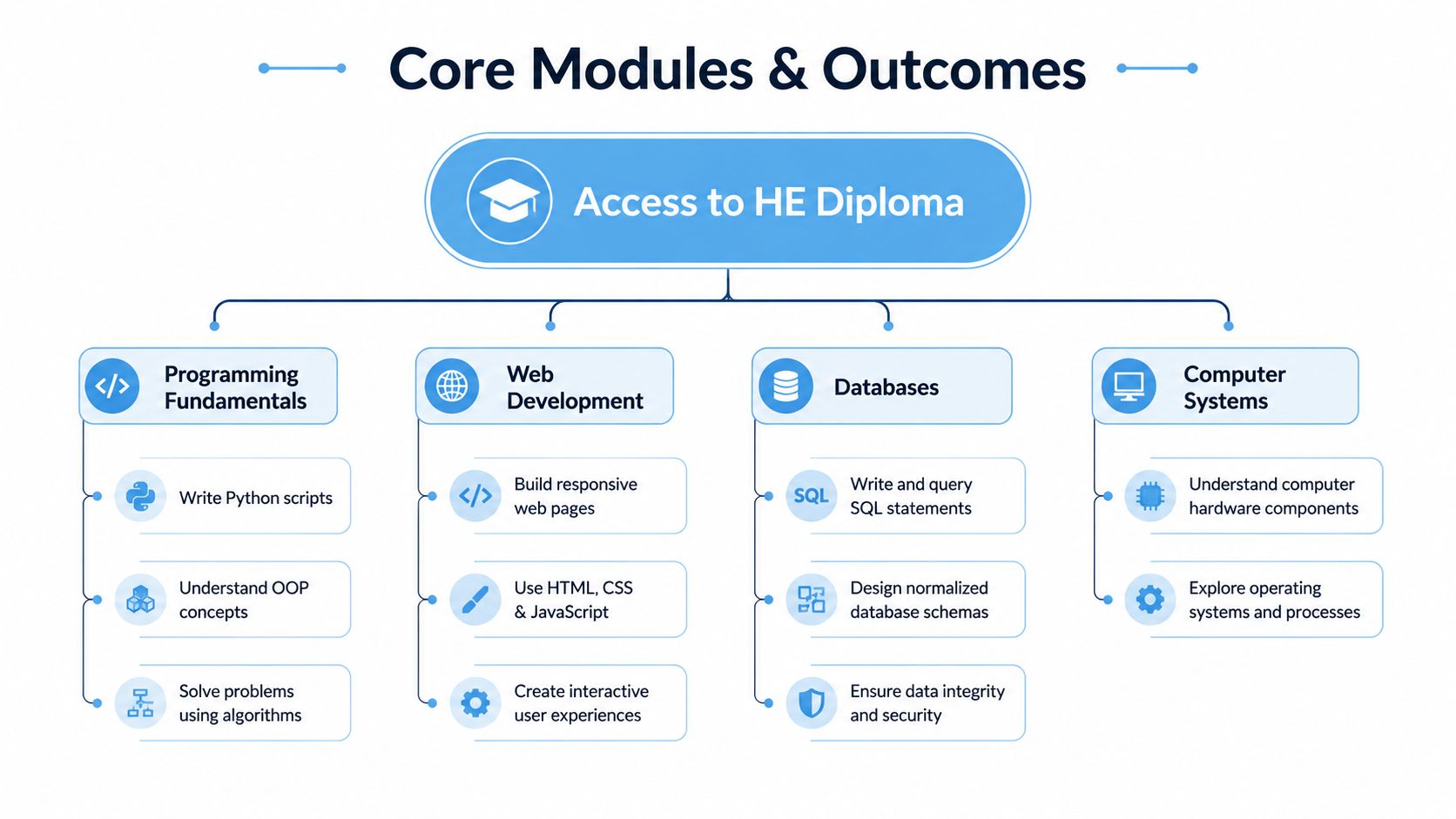
An Access to HE Computing course usually combines technical units with academic skills. The exact unit names vary between providers, so treat the following as a practical guide rather than a guaranteed syllabus.
Programming fundamentals
Programming teaches you to express a solution as a sequence of instructions a computer can follow. You may begin with variables, conditions, loops, functions, and debugging. A small script that checks whether a customer qualifies for a service, for example, helps you practise logic that later appears in larger applications.
You're not just memorising commands. You're learning to break a problem into manageable parts, test your assumptions, and improve a solution when the first attempt fails. Those habits matter in every computing degree.
Web development and user interaction
Web development introduces the structure and presentation of websites. You may work with HTML to organise content, CSS to control appearance, and introductory scripting to make pages respond to users.
A useful analogy is a shop. HTML creates the rooms and shelves, CSS controls the layout and appearance, and scripts handle actions such as checking a form or updating a display. This module can make abstract ideas visible because you can open a browser and see the result of each change.
Databases and information management
A database stores information in a planned way so that it can be found, updated, and related accurately. Think of a library catalogue. Books, authors, borrowers, and loans are separate types of information, but the catalogue connects them so staff can answer useful questions.
You may study tables, fields, relationships, queries, and data integrity. The learning outcome isn't just the ability to store records. It's the ability to design information structures that reduce confusion and support reliable decisions.
Computer systems and academic skills
Computer systems units help you understand the components behind everyday devices and networks. You might explore hardware, operating systems, software, storage, security, and how systems communicate.
Academic skills run alongside the technical work. You'll practise finding suitable sources, planning assignments, referencing, writing clearly, and evaluating information. These skills can feel separate from coding, but university computing degrees require both technical work and written explanation.
The course page should tell you how units are assessed. Depending on the provider, assessment may include written assignments, practical tasks, presentations, projects, or examinations. Credits act like units in a larger qualification. You complete the required credit pattern, meet the learning outcomes, and demonstrate that you can apply what you've studied.
For a visual introduction to the role of learning outcomes, explore what learning outcomes are.
A typical study week might involve reading course material, watching or reviewing a lesson, completing a practical exercise, and drafting assessed work. The strongest learners don't wait until an assessment deadline to discover that a technical idea is unclear. They test small examples early and contact their tutor with a specific question.
Entry Requirements and Progression Paths
Entry rules vary by provider and by the university degree you hope to enter. Many Access courses are designed for adults, so an application may be judged through a combination of age, previous study, work experience, an interview, or an initial assessment.
Traditional A levels may not be required, but you still need to show that you can manage written study. Some providers ask for English and maths qualifications. Others offer Functional Skills routes or assess your current level before enrolment. Check these conditions before paying a deposit or arranging study around work and family responsibilities.
Start with the degree, then choose the diploma
Begin with the university course you want, then work backwards to the Access diploma. A computer science degree may emphasise mathematics and programming. Software engineering may give more weight to problem-solving and development methods. Cyber security, data science, and information technology degrees can set different subject or grade conditions.
Make a shortlist of universities and check:
- Qualification acceptance: Confirm that each university accepts the specific Access diploma you are considering.
- Subject content: Ask whether the degree expects particular computing or mathematics units.
- Grading conditions: Check the required Access grades and any distinction or merit pattern.
- Additional requirements: Find out whether you need an interview, portfolio, test, or other evidence.
- Application timing: Contact admissions staff early if your previous qualifications or personal circumstances are unusual.
This check prevents a common problem: completing a course that does not match the progression conditions for your chosen degree. Admissions teams can also explain whether your current work experience or qualifications meet the entry profile.
What the demand tells adult learners
Computing remains a substantial university pathway. In 2025, 31,670 UK students of all ages were accepted to computing degrees, the second-highest total on record, and acceptances were 3% lower than the previous cycle, according to BCS analysis of demand for UK computing degrees. Among UK students aged eighteen, acceptances reached 16,865, described by BCS as the third-highest total on record, although that figure also followed a 9% annual decline.
The same analysis reports that the ratio of men to women among eighteen-year-old UK-domiciled computing entrants improved to 4:1, compared with 5.5:1 in 2019/20. Earlier figures cited by BCS show that women represented 14.1% of computing undergraduates in England in 2020/21. For adult learners, the wider point is that computing continues to offer several routes into higher education, even when the traditional school-to-university route was not available.
After the diploma, possible degree directions include computer science, software engineering, cyber security, data science, web development, and IT management. Related roles may involve development, testing, technical support, systems analysis, data, security, or project coordination. Keep records of completed units and results. When you begin applying for work or placements, learn the best way to list education on a resume.
Studying Online and Flexible Learning Tips
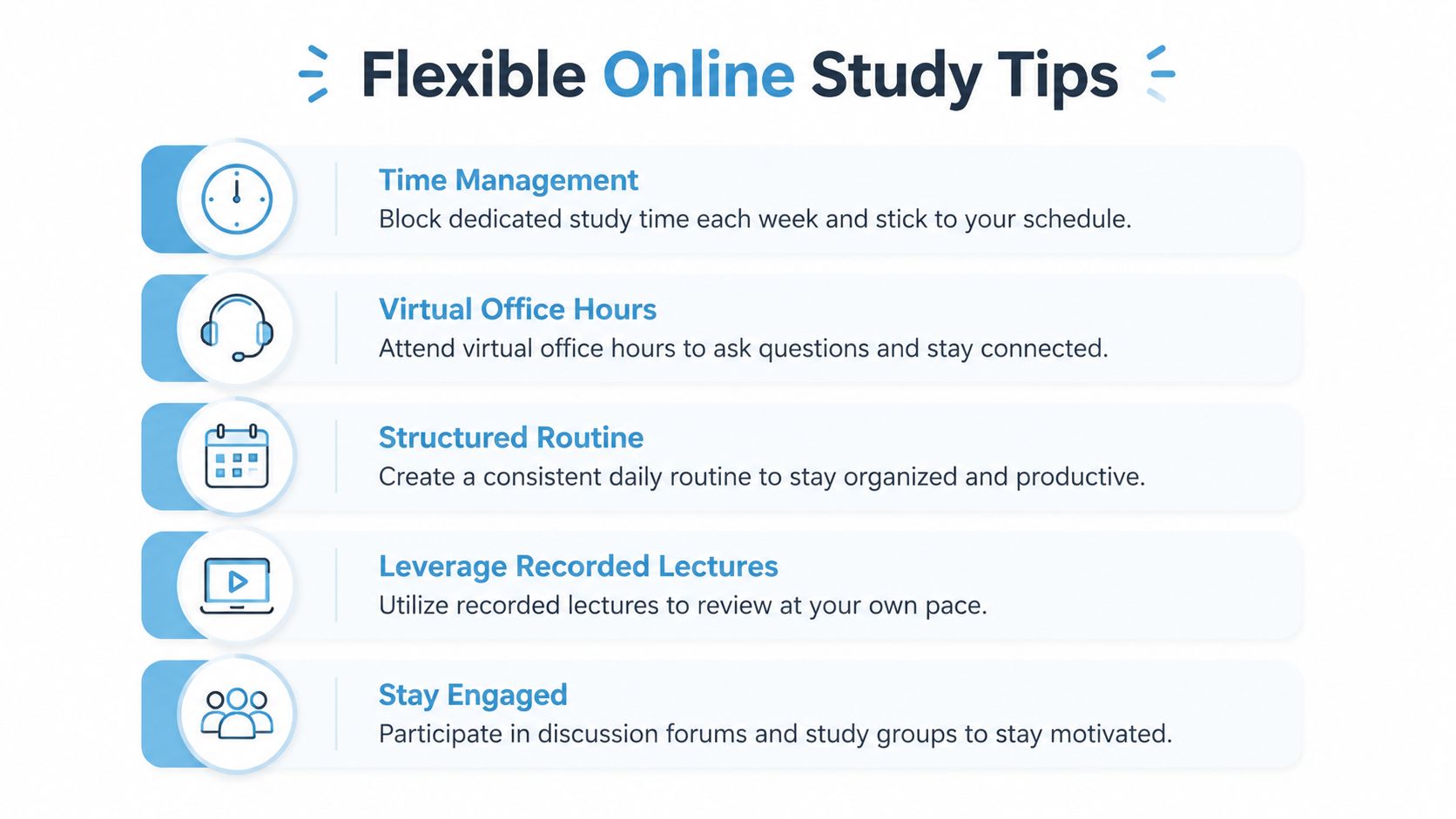
Your week may include a work shift, a school run, and a computing task due on the same day. Online study can fit around those responsibilities, but flexibility works best when you create a practical structure. You might read after work, practise coding during a quiet morning, and contact a tutor through email or the learning platform instead of travelling to a classroom.
A campus course gives you immediate access to tutors, computers, and classmates. Online learning gives you more control over place and timing, while leaving more organisation to you. The workload remains. You decide when and where to complete it.
Build a routine that survives real life
A rigid timetable can fail when a child is ill or a shift changes. Use weekly study blocks, then keep a smaller recovery period for unfinished work. Store course files in labelled folders, back up assignments, and record the next action before ending each session.
“Study programming” is too broad for a busy evening. “Complete the functions exercise and write two questions for the tutor” gives you a clear task and a sensible stopping point.
- Use short preparation windows: Download or save reading materials before your planned study period.
- Separate learning from assessment: Practise a concept before trying to turn it into a finished assignment.
- Ask focused questions: Include the code, instruction, or paragraph that caused the difficulty.
- Protect family expectations: Explain when you are unavailable and when you will be free again.
- Review progress weekly: Move unfinished tasks into the next plan instead of losing track of them.
Plan for technical interruptions
Computing courses may require coding environments, file uploads, cloud tools, video lessons, and online assessments. If your connection is unreliable, download resources where possible, use recorded teaching, practise locally, and identify assessment tasks that do not require continuous video access.
Before enrolling, ask what happens when software, hardware, or broadband fails. Check whether the learning platform works on your device, whether lessons are available asynchronously, and how tutors handle missed live sessions. A provider should offer practical support rather than only a login and password.
Keep a backup plan that matches your circumstances. A library, community learning centre, or trusted relative's broadband may help, but avoid relying on a place you cannot reach consistently. If you share housing, work irregular hours, or care for relatives, schedule important uploads and live sessions around the times when your connection and workspace are most dependable.
Review online Access to HE course options while comparing each provider's teaching format, technical support, and expectations for independent study. Ask specific questions before committing, so the course fits your home setup as well as your career plans.
Funding and Payment Options
The cost of study can feel like the largest obstacle, especially when you're already paying rent, transport, childcare, or household bills. Don't assume the advertised tuition figure is the only route to payment. Funding eligibility depends on the course, provider, personal circumstances, and previous study, so you'll need a personalized answer rather than a general promise.
Check learner finance first
An Advanced Learner Loan may cover eligible tuition fees. Repayments begin only when your income reaches the relevant repayment threshold, and the loan isn't normally repaid while you're below it. Confirm the current rules, eligibility conditions, and repayment arrangements through official government guidance or your provider's funding adviser.
Some providers offer interest-free instalment plans. These can spread payments across an agreed period without requiring commercial credit, but read the schedule carefully and check what happens if your circumstances change.
Look beyond the tuition fee
Ask about bursaries, hardship support, employer sponsorship, and local digital inclusion schemes. An employer may contribute if the qualification supports a move into internal systems, data, or technology work. A provider may also help you identify public support that isn't obvious from the course page.
Your budget should include the equipment needed to participate. A device, broadband, software, printing, and a quiet place to work can all affect whether you complete assignments comfortably. If your household finances are tight, raise those concerns before enrolment rather than waiting for a missed deadline.
Practical rule: Ask for a written breakdown of tuition, payment dates, funding conditions, equipment support, and possible additional costs before you commit.
Financial planning should also account for your time. A payment plan may make tuition manageable, but you still need a realistic arrangement for work and family commitments. A frank conversation with an adviser can help you compare full-time, part-time, and flexible options without relying on assumptions.
Digital Readiness and Device Requirements
Your first online computing session may begin after work, with a child needing attention and a weak home connection. Preparation matters because computing study involves more than opening a course page. You may download software, organise files, use a development environment, join live sessions, protect accounts, and submit work in a required format. A phone or basic tablet can support messages and reading, but sustained programming and assessment usually require a laptop or desktop.
The Jisc evidence on digital accessibility highlights access issues that affect participation. For an adult learner, the practical response is to test the equipment, connection, software, and study space before lessons begin. Ask the provider what support is available if your setup does not meet the course requirements.
Complete a readiness check
Request the provider's current technical specifications. Requirements vary between courses, particularly for coding tools, assessment platforms, and security settings, so an old checklist may mislead you.
Check that you can:
- Use a suitable computer: Confirm that your laptop or desktop runs the required browser, office software, coding tools, and security updates. If you are buying a device, compare affordable laptop specs against the provider's requirements rather than choosing by appearance alone.
- Work with files: Practise creating folders, renaming documents, compressing files when required, and backing up assignments.
- Join online teaching: Test your webcam, microphone, browser permissions, and headphones before the first session.
- Manage connectivity: Identify a library, workplace, or other suitable location where you could study if home broadband fails.
- Protect your work: Use strong passwords, install updates, store files securely, and keep a separate backup.
A reliable routine helps when study competes with employment and family responsibilities. Charge the device before a session, keep course files in clearly named folders, and reserve short study periods that fit around your existing commitments. These small habits reduce the chance that a technical problem becomes a missed deadline.
Evidence cited by OfS polling found that 18% lacked access to a computer, laptop, or tablet, while 56% lacked access to appropriate online course materials, as reported in Open Awards' discussion of Access to HE opportunity and progression. If equipment is a concern, ask your provider, local library, university, or community programme about loan schemes and technical support before enrolling.
Application Process and Success Stories
A sensible application starts with your destination degree, not with the first course advertisement you find. List the universities and subjects you're considering, check their Access requirements, and ask each provider whether its Computing diploma supplies the relevant preparation.
Then follow a practical sequence:
- Compare providers: Check accreditation, unit content, tutor access, assessment methods, start dates, and technical support.
- Discuss your background: Explain previous qualifications, work experience, caring responsibilities, and any concerns about English, maths, devices, or connectivity.
- Confirm progression: Request clear guidance on the degrees for which the diploma is intended.
- Prepare for enrolment: Arrange funding, a study routine, equipment, and a backup location before your first assignment.
- Treat early work as evidence: Use initial tasks to identify gaps and ask for help while they're still manageable.
Adult learners don't succeed because their circumstances are perfect. They succeed by making the route specific, building support around predictable obstacles, and continuing after difficult topics expose gaps in their knowledge. Your application should tell the provider why computing matters to you and how you plan to study consistently.
If you're ready to compare your options, contact Access Courses Online about its online Computing Access to Higher Education Diploma, ask about entry requirements and funding, and confirm whether the course matches your intended university progression. Visit Access Courses Online to discuss your next step with the admissions team and start building a practical plan around your work and family commitments.