
When you’re citing a website, it all boils down to four key pieces of information: the author, the publication date, the title of the page, and the URL. Once you've got these, you can slot them into whatever referencing style your course requires, whether it's APA, MLA, or Harvard.
Why Mastering Website Citation Is a Non-Negotiable Skill
As a student, you're swimming in a sea of online information. Knowing how to properly cite a website isn’t just about ticking a box for your tutor—it’s about building your reputation as a credible, trustworthy researcher. Getting your referencing right is a cornerstone of your academic journey. It shows you respect other people's work and strengthens your own arguments with solid, verifiable evidence.
Honestly, this skill is your best defence against accidental plagiarism. For busy students, especially those juggling studies with work and family, building good citation habits from day one will save you a world of time and stress down the line. It’s what ensures your work consistently hits the high standards expected in higher education.
The Foundation of Academic Credibility
Proper referencing tells your marker that you've really dug into your topic and can clearly separate your own brilliant ideas from the work of others. Think of it as showing your working in a maths problem; it proves exactly how you reached your conclusions.
Here in the UK, where we’re all constantly online, being able to judge and credit web sources is more important than ever. The amount of information out there is staggering. In November 2024 alone, Google.com had over 4.16 billion visits just from the UK. That gives you an idea of the vast digital library you need to navigate responsibly.
Citing Official Sources for Authority
A brilliant way to give your assignment an instant credibility boost is by citing authoritative sources like government bodies. The Office for National Statistics (ONS), for example, is the go-to source for reliable UK data.

Using a clear and consistent citation style, just as professional organisations like the ONS do, lends your work an air of authority and polish.
The Office for National Statistics (ONS) is a great example of best practice. In its service manual, it recommends clear, hyperlinked citations that let readers trace information easily without needing a huge, clunky reference section at the end. This is a perfect approach for online submissions.
It's not just about knowing how to cite; it helps to understand how institutions check for these things, too. It's worth learning how to check for plagiarism in Google Docs just to stay ahead of the game.
Ultimately, building strong citation skills from the very beginning makes every future assignment that much easier, especially when you can slot your research neatly into a well-thought-out structure. For more on that, take a look at our guide on creating an effective https://accesscoursesonline.com/blogs/news/essay-plan-template.
Finding the Four Core Elements of Any Citation
Before you can build the perfect citation, you need to gather your raw materials. Think of it like being a detective, searching a webpage for clues. No matter which referencing style you're using—be it APA, Harvard, or anything else—you'll almost always need the same four core pieces of information.
The good news? These details usually live in predictable places. Once you know where to look, you can get what you need in seconds, making referencing feel much less like a chore.
Uncovering the Author
First up, you need to figure out who wrote the content. On a blog post or online news article, the author’s name is usually right under the main headline or at the very end of the piece. Just look for a byline like "By Jane Smith".
But what if there isn't an individual author? In that case, the organisation behind the website steps into that role. For example, if you're citing a health guide on the NHS website, the National Health Service is your author.
Pinpointing the Publication Date
Next, you're looking for when the information was published. This is a crucial detail because it tells your marker how current—and therefore how relevant—the source is. The date is often located near the author's name, just beneath the title of the page.
- For news articles and blog posts: You'll usually find a specific date, like "15 October 2023".
- For general webpages: If you can't find a date up top, check the footer at the very bottom of the site for a copyright year (e.g., © 2024). This is a good fallback.
Keep an eye out for multiple dates. Sometimes you'll see "updated on" or "last modified". For most referencing styles, it's best to use the most recent date, as it reflects the information's current state.
Identifying the Page Title
This one is usually the easiest to spot. The title of the specific page or article you are citing is nearly always the most prominent text at the top of the page. It’s the headline that grabs your attention.
It's important not to confuse this with the name of the overall website. For example, the page title might be "How to Grow Tomatoes Indoors," while the website is called "Gardening Weekly." You need the specific page title for your reference.
Remember to copy the title exactly as it appears. Pay attention to its capitalisation and spelling. This is the digital equivalent of quoting a book's chapter title correctly and it maintains the accuracy of your reference.
Locating the URL
Finally, you need the web address, or URL. This is the unique link in your browser's address bar that takes someone directly to the source you've used.
Make sure you copy the full, direct URL to the exact page, not just the website's homepage. So, instead of www.bbc.co.uk, you need the complete link to the specific story, like www.bbc.co.uk/news/science-environment-12345678. This ensures your marker can find your source with a single click.
To make this even easier, here's a quick cheat sheet for finding these elements on any webpage.
Quick Guide to Finding Website Citation Information
Use this table as a quick reference to locate the essential components for any website citation.
| Component | What It Is | Where to Look |
|---|---|---|
| Author | The person or organisation responsible for the content. | Directly under the article headline, at the end of the post, or in the website's "About Us" page for corporate authors. |
| Date | The date the content was published or last updated. | Near the author's name, under the title. Check the website footer for a copyright year if no specific date is visible. |
| Page Title | The headline or specific title of the webpage you are on. | The largest, most prominent text at the top of the page. Found in the browser tab as well. |
| URL | The unique web address for the specific page. | The address bar at the very top of your web browser. Copy the entire link. |
Getting into the habit of grabbing these four pieces of information every time you find a useful source will save you a massive headache later on. You'll have everything you need, ready to slot into whichever referencing style your assignment requires.
Getting to Grips with the Major Citation Styles
Once you’ve nailed finding those four core elements for a citation, it’s time to put them into action. This is where the real work of citing a website properly begins. You’ll quickly find that different subjects and universities have their own preferred styles, so getting familiar with the most common ones will give you a massive advantage.
We’re going to walk through the four big players you’ll almost certainly meet on your Access to HE course: APA, MLA, Chicago, and Harvard. To keep things crystal clear, we’ll use the same real-world example for each one. Seeing them side-by-side is the best way to spot the small but crucial differences.
Let's imagine we're citing a BBC News article with these details:
- Author: Jane Smith
- Publication Date: 15 October 2023
- Page Title: The Future of Remote Learning in the UK
- Website Name: BBC News
-
URL:
https://www.bbc.co.uk/news/education-12345678
Armed with this info, we can build a perfect citation in any of the required formats.
Understanding APA Style
If you’re studying social sciences, education, or psychology, you’ll probably be using APA (American Psychological Association) style. It’s designed for clarity and puts a big emphasis on the publication date, showing how current your research is. This is incredibly helpful when you're writing about fast-moving topics where the latest information is everything.
In your reference list at the end of an essay, the APA citation would look like this:
APA Reference List Example:
Smith, J. (2023, October 15). The future of remote learning in the UK. BBC News. https://www.bbc.co.uk/news/education-12345678
Take a look at the details. The author’s surname comes first, followed by their initial. The date is tucked into parentheses, and the article title is in sentence case and italicised. The website name itself (BBC News) isn't italicised, and the full URL is right at the end.
When you mention the source in your actual essay, the in-text citation is much simpler – it just points your reader to the full reference.
APA In-Text Citation Example:
According to recent analysis, the landscape of remote learning is shifting (Smith, 2023).
Getting to Grips with MLA Style
MLA (Modern Language Association) style is the standard in the humanities—think English literature, arts, and philosophy. MLA’s format highlights the author and the specific page title, which helps readers quickly locate the source material.
Here’s how our BBC article looks on an MLA Works Cited page:
MLA Works Cited Example:
Smith, Jane. "The Future of Remote Learning in the UK." BBC News, 15 Oct. 2023, www.bbc.co.uk/news/education-12345678.
The differences, though subtle, are important. MLA uses the author's full name. The article title goes in "quotation marks" and uses title case, while the website name, BBC News, is italicised. Notice the date format is day-month-year, and the URL at the end drops the "https://".
The in-text citation for MLA is even more streamlined.
MLA In-Text Citation Example:
The landscape of remote learning is shifting significantly (Smith).
Decoding Chicago Style
You’ll often see Chicago style (specifically the Notes and Bibliography system) used in history, fine arts, and some social science fields. Its trademark is the use of footnotes or endnotes, which lets you provide detailed citations without breaking the flow of your writing.
In a Chicago-style bibliography, our example citation would be formatted this way:
Chicago Bibliography Example:
Smith, Jane. "The Future of Remote Learning in the UK." BBC News, October 15, 2023. https://www.bbc.co.uk/news/education-12345678.
Again, we see the author's full name and the title in quotation marks. The date is written out in full, and the URL sits at the end, providing a complete source overview.
Where Chicago really stands apart is its footnote system. The first time you cite the source in your text, you’ll add a full footnote at the bottom of the page.
Chicago Footnote Example:
- Jane Smith, "The Future of Remote Learning in the UK," BBC News, October 15, 2023, https://www.bbc.co.uk/news/education-12345678.
If you refer to the same source again later, you can just use a shortened version.
Mastering Harvard Style
Harvard referencing is a firm favourite in the UK, especially in business, social sciences, and natural sciences. It’s an author-date system, a bit like APA, which makes it very easy to see who said what and when. Its straightforward nature is one of the main reasons it’s so popular on Access to HE courses.
Here’s the Harvard reference list entry for our BBC article:
Harvard Reference List Example:
Smith, J. (2023) The future of remote learning in the UK. BBC News. Available at: https://www.bbc.co.uk/news/education-12345678 (Accessed: 25 November 2024).
Harvard looks similar to APA but has a couple of key differences. The year is in parentheses, and the article title is italicised. Crucially, it includes the phrase "Available at:" before the URL and an "Accessed" date at the very end. This is vital for web sources because it records when you retrieved the information from a page that could potentially change.
To see this in more detail, check out our complete guide on how to reference a journal article in Harvard style—the principles are easy to apply here, too.
The in-text citation is pretty much identical to APA’s.
Harvard In-Text Citation Example:
The landscape of remote learning is shifting (Smith, 2023).
At the end of the day, the best citation style is always the one your tutor tells you to use. Make sure you double-check your assignment brief or course handbook. Sticking to one style consistently is the secret to scoring top marks for your academic presentation.
How to Handle Missing Citation Information
We’ve all been there. You find the absolute perfect source for your assignment—a webpage brimming with useful stats and quotes—but a crucial piece of information is missing. Maybe there’s no author listed, or you can’t find a publication date to save your life. It’s a frustrating moment, but it doesn't mean you have to ditch the source entirely.
Luckily, every major citation style has a plan for these exact situations. Think of them as backup rules designed to keep your references looking professional and consistent, even when the source isn't perfect. Getting to grips with these little workarounds is a key part of mastering academic referencing.
The infographic below gives a quick overview of the main citation styles we'll cover, each with its own specific way of handling those missing details.
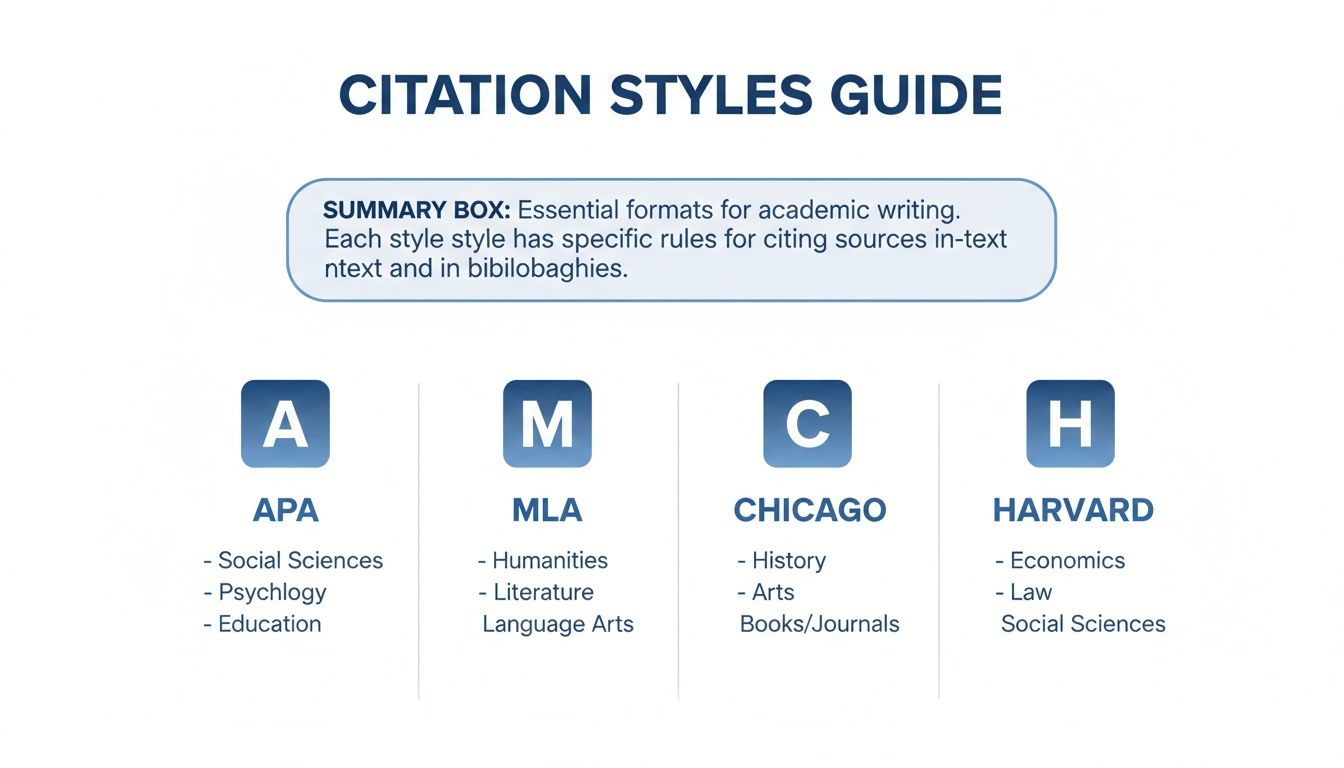
Whether you’re using APA, MLA, Chicago, or Harvard, there’s a clear convention to follow. Let’s break them down.
When There Is No Author
This is probably the most common referencing headache you’ll face. If you can't find a person's name, the first thing to check is whether an organisation can be credited instead. For example, if you’re citing a guide from the NHS, you’d simply use "National Health Service" as the author. Simple.
But what if there's no individual or corporate author? The solution is straightforward: move the title of the webpage into the author's spot. This is the standard move for most styles.
- APA & Harvard: The page title goes to the front of the reference. For your in-text citation, you'll use the first few words of the title in quotation marks, followed by the year, like this: ("Understanding Blood Pressure," 2023).
- MLA: It’s a similar story. You’ll start the Works Cited entry with the page title in quotation marks, and your in-text citation will use a shortened version of that title.
- Chicago: The bibliography entry also kicks off with the title, and the corresponding footnote follows the same logic.
Using the title ensures your in-text citation still points your reader directly to the right entry in your reference list, keeping your evidence clear and easy to trace.
Dealing with No Publication Date
What happens when you can’t find a publication date, a "last updated" note, or even a copyright year in the website's footer? It’s another classic problem, but again, the solution is simple.
Just use the abbreviation n.d., which stands for "no date." This tells your reader that you’ve done your homework, and the date genuinely isn't available.
Using 'n.d.' is a mark of a careful researcher. It shows your tutor that you understand the rules and are applying them correctly, rather than just leaving a blank space or guessing a date.
Here’s how you’d slot it into your citations:
APA & Harvard In-Text Citation:
This approach is common in digital media (Smith, n.d.).
APA & Harvard Reference List:
Smith, J. (n.d.). Title of the webpage. Name of Website. Retrieved Month Day, Year, from URL
MLA Works Cited:
Smith, Jane. "Title of Webpage." Name of Website, n.d., URL.
By using "n.d.", you keep your citation honest and accurate, reflecting what’s actually on the webpage. It’s the proper academic way to handle the gap.
Citing a Webpage Without a Title
This one is much rarer, but you might occasionally stumble upon a source that has no clear title or headline. This can sometimes happen with obscure web pages or user-generated content. If you find yourself in this situation, you’ll need to create a short, descriptive title yourself.
The goal is to give your reader enough context to understand what the page is about.
- Create a description: Write a brief, clear summary of the page's content.
-
Use square brackets: Place your description inside square brackets
[ ]to show that you've added it yourself.
For instance, if you were citing a webpage that was just a table of statistics on UK nursing school admissions, your created title might look like this in your reference list:
APA Example with No Title:
National Statistics Body. (2023). [Data on UK nursing school admissions for 2022-2023]. Retrieved from URL
This handy technique makes sure even the most unusual sources can be cited accurately and transparently. It provides clarity for your reader and shows your attention to detail—so you won't lose marks over a confusing or incomplete reference.
Citing More Than Just a Standard Webpage
Your research will almost certainly take you beyond standard articles and blog posts. In fact, some of the most current and valuable information is scattered across a huge range of digital formats, from educational YouTube videos to insightful social media discussions. Knowing how to cite a website isn't just about articles; it's about handling this diverse digital evidence correctly and confidently.
Learning to reference these less traditional sources is a key skill. It shows your tutors that you can engage with modern forms of information and apply academic rigour, no matter the medium. Let's walk through how to handle some of the most common formats you'll encounter.
How to Cite a YouTube Video
YouTube has become a massive library of educational content, hosting everything from documentaries to expert lectures. When you’re citing a video, the main thing to remember is to treat the uploader as the author. This could be a person's name or an organisation's channel name.
The format feels quite similar to a standard webpage reference, but with a few tweaks to reflect that it’s a video.
- APA: Uploader's Name [Username]. (Year, Month Day). Title of video [Video]. YouTube. URL
- Harvard: Uploader's Name (Year) Title of video. Available at: URL (Accessed: Day Month Year).
Let’s say you’re citing a CrashCourse video on study skills. Here’s how it would look.
Harvard Example:
CrashCourse (2017) How to study for a test. Available at: https://www.youtube.com/watch?v=16C-wBO9o6s (Accessed: 25 November 2024).
This format clearly tells your reader who made the video, what it's called, and exactly where to find it, adding a layer of academic credibility to a source that might otherwise seem informal.
Citing Social Media Posts
Platforms like X (formerly Twitter) or Facebook can be surprisingly useful sources for direct quotes or gauging public opinion. When you cite a post, the author is simply the person or organisation who posted it. The "title" is the full text of the post itself, up to the first 20 words.
Because social media content is so brief and can change quickly, it's crucial to capture it accurately.
- APA: Author, A. A. [@username]. (Year, Month Day). Full text of the post up to 20 words [Description of content, e.g., Image attached]. Site Name. URL
- Harvard: @Username (Year) Full text of post. Site Name, Day Month. Available at: URL (Accessed: Day Month Year).
APA Example:
Access Courses Online [@AccessCourses]. (2024, November 15). Ready to start your journey to university? Our Access to HE Diplomas are designed for adult learners just like you [Image attached]. X. https://twitter.com/AccessCourses/status/123456789
Referencing Online-Only Journals
Many modern academic journals exist purely online, with no print version at all. Citing these is almost identical to referencing a print journal, but you must include a URL or a DOI (Digital Object Identifier).
Think of a DOI as a permanent digital fingerprint for an academic article. Even if a website's URL changes, the DOI will always point to the right place, making it the gold standard for your references.
If you can find a DOI, always use it instead of a standard URL. It makes your reference far more stable and reliable for anyone trying to find your source later on.
The structure is usually straightforward:
- Author(s): The writer or writers of the article.
- Year: The year it was published.
- Article Title: The specific title of the piece.
- Journal Title: The name of the online journal, which is often italicised.
- Volume and Issue Number: This helps pinpoint the article within the journal's archives.
- DOI or URL: The permanent link to the source.
Harvard Example:
Davies, L. and Williams, R. (2023) ‘The impact of flexible learning on adult education outcomes’, Journal of Online Pedagogy, 12(4), pp. 210-225. doi:10.1234/jop.2023.001.
Getting these details right shows you are a capable and meticulous researcher, ready for the demands of higher education.
Your Essential Citation Toolkit and Resources
Let's be honest, referencing can feel like a chore. But it doesn't have to be a painful process. With the right tools and a little practice, you can get it done quickly and accurately, leaving you more time to focus on the actual content of your assignment.
Think of this section as your personal toolkit, designed to make citing websites much easier. I’ve put together a handy cheat sheet that summarises the key formats for APA, MLA, Chicago, and Harvard. It’s a perfect quick-glance guide to keep on your desk. I'll also share some simple templates you can copy and paste to speed things up.
Using Online Citation Generators Wisely
You’ve probably come across online citation generators that promise to create perfect references in a flash. While these tools can be a fantastic starting point and a real time-saver, they are far from foolproof. A common mistake is to trust their output without a second glance.
Often, these generators make small but crucial errors. They might misidentify the author, format the date incorrectly for your chosen style, or mess up the capitalisation in a title. The best approach is to use them to pull together the basic information, but always, always double-check the final citation against the official rules for your required style.
Think of a citation generator as a helpful assistant, not the final authority. Your own knowledge of the citation style is your most powerful tool for ensuring accuracy and securing those crucial marks for presentation.
Quick Reference Templates
To give you a head start, here are some simple copy-and-paste templates for a standard webpage. Just replace the placeholder text with your source’s details, and you’re good to go.
- Harvard: Author, A. (Year) Title of page. Available at: URL (Accessed: Day Month Year).
- APA: Author, A. A. (Year, Month Day). Title of page. Website Name. URL
Having these basic structures ready makes the whole process feel much more straightforward. It helps build good habits and ensures you don't miss any key components when you're under pressure to hit a deadline.
Ultimately, strong referencing is just one piece of the puzzle. For guidance on putting it all together to create a compelling piece of academic work, our detailed guide on how to write academic essays provides a solid framework for structuring your arguments effectively. This toolkit, combined with strong writing skills, will set you up for success.
Common Questions About Citing Websites
Okay, let's wrap things up by tackling a few of the most common questions that pop up when you're trying to cite a website. Think of this as a quick-fire round to handle those tricky little scenarios and make sure your referencing is always spot-on.
Getting these details right is all about building your confidence and making sure your academic work is consistently professional.
Do I Always Need the Full URL?
Yes, you do. For the most up-to-date citation styles like APA 7th ed. and MLA 9th ed., popping in the full, direct URL is non-negotiable. It works just like a live link, letting your marker click straight through to the exact source you used.
You also generally don't need to write "Retrieved from" before the link anymore. The only real exception is if you're citing something that's designed to change over time, like a live-updated statistics page or a wiki entry.
A complete URL is the digital equivalent of providing a page number in a book citation. It ensures traceability and shows your marker that you're pointing them to the precise location of your evidence.
What If an Organisation Is the Author?
This happens all the time, especially if you're citing official reports or government guides. If a webpage is published by a group like the National Health Service (NHS) or the Office for National Statistics (ONS) and there's no individual author named, you simply use the organisation's name instead.
The organisation's name just takes the author's spot, both in your in-text citation and in your final reference list. It's as simple as that.
- In-text example (Harvard): (National Health Service, 2023)
- Reference list example (Harvard): National Health Service (2023) Title of page...
What Is a Reference List Versus a Bibliography?
This is a really important one. Although you might hear people use the terms interchangeably, they actually mean two different things in academic writing. It's vital to know which one your assignment requires.
A reference list only includes the sources you have actively cited within the body of your essay. In contrast, a bibliography can include all the sources you looked at during your research, even if you didn't end up quoting or paraphrasing them. For most UK university assignments, you'll be asked for a reference list.
Ready to take the next step towards your degree? At Access Courses Online, we provide accredited, flexible courses designed for adult learners returning to education. Find out how you can start your journey to university today. Visit us at https://accesscoursesonline.com.